

The topic Top 5 Open-Source Music Apps for Free Spotify & YouTube Music Premium Features is drawing steady attention: readers, analysts, and industry watchers are all tracking how the story may unfold in the days ahead.
This is taking place in a fast-moving context — product cycles, platform shifts, and competitive moves can reshape the outlook quickly, so the details below are worth a careful read.
What follows is a clear walkthrough of the main facts and angles you need to make sense of the news.
Subscription prices are going through the roof. And when you stack multiple subscriptions together, it can put a big hole in your pocket. For listening to music, we usually depend on Spotify and YouTube Music. They are the default music streaming sources for millions across the globe. Though there are alternatives from which you can hear high-quality audio, they just can’t match the ease of popular apps. But you are bombarded with ads, and several features are locked behind a paywall unless you pay.
Thankfully, you don’t have to search the internet for free options. Developers around the world have built free apps that give you many of those perks. Below are five of the best, what each does well, and what to watch out for before installing.
To be clear, most of these apps are clients. This means that they don’t store any music themselves. They plug into a service like YouTube Music and show it in a cleaner, ad-free interface with extra features on top, which you’d usually get after paying for a premium subscription. For me, Spotify has been the go-to music streaming app, but slowly the app has become quite greedy.
After a few times, the next and previous song buttons get locked, and it asks you to pay to unlock them. I mean, what is wrong with companies today? Thankfully, I have now ditched Spotify and have picked one of the below open-source music options.
The catch is that these apps rely on unofficial methods to fetch music, so they can break when YouTube or Spotify changes something. Treat them as great free alternatives, but not as rock-solid replacements. Let us take a look at the free alternatives.
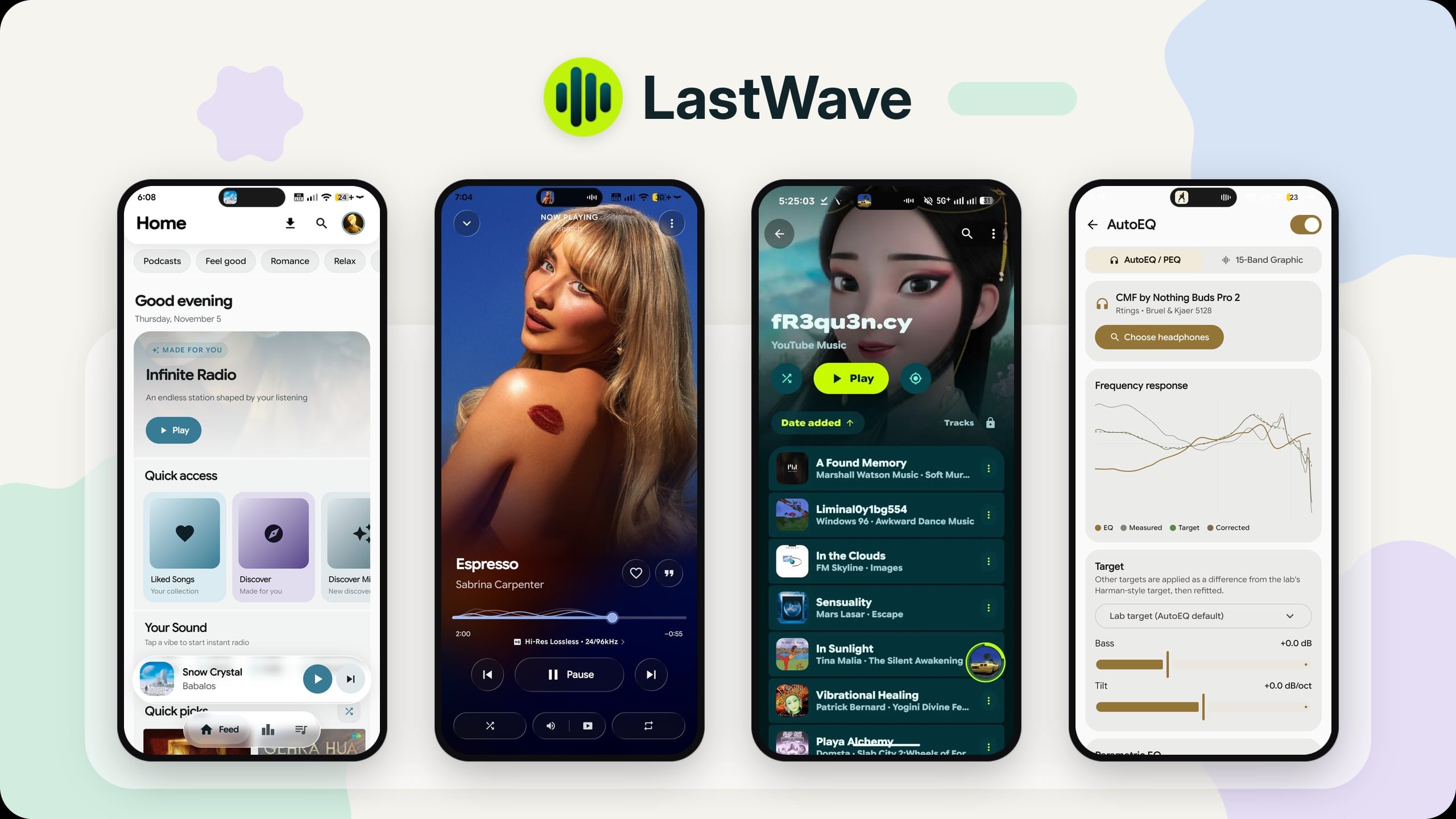
If you care about how your music sounds, LastWave is the one to install first. It’s a free YouTube Music client for Android, Windows, macOS, and Linux. Most of us would care about the free music that we get with LastWave, but you will soon appreciate the quality of music that it offers. And since it is a YouTube Music client, you are getting access to almost every song that is available on YouTube.
The headline feature is lossless FLAC audio, up to 24-bit/192 kHz. When you press play, the song starts playing right away on the fastest available stream, and while you listen, the app fetches the lossless version in the background and switches over once it’s ready. On compatible phones and headphones, LastWave also plays the Dolby Atmos version of a song automatically. For those who own a USB DAC or a pair of IEMs, there’s a bit-perfect mode that sends raw, unprocessed audio straight to your device.
The app is packed with features that normally sit behind a subscription. The lyrics are synced word-by-word and pulled from sources like Apple Music, Musixmatch, and LRCLIB. There’s a 10-band equalizer with presets for thousands of headphone models, and smart playlists that build mixes from your listening history. Plus, you have the option to import playlists from Spotify, Apple Music and YouTube Music in seconds, and even sync your Spotify liked songs.
Not everyone wants a hundred settings and toggles. Some people just want to listen to their favorite music without having to deal with ads and a hundred pop-ups about purchasing the subscription between two songs. Musify is for people who just want to open an app, search for a song, and press play. It’s a lightweight Android app built around Material You, which means its colors automatically match your phone’s theme and wallpaper.
Using it is fairly easy. You search for songs, albums, artists, or playlists and start streaming over Wi-Fi or mobile data. If you want to save data or listen on a flight, you can download tracks and play them offline. It lets you create your own playlists, rename and reorder them, or import existing ones from online sources. The player shows lyrics so you can follow along. You can also control the quality of the audio.
There are no annoying banner ads, no audio ads, no sign-up, and no tracking inside the app, and the interface is translated into dozens of languages by the community. I found this to be a great choice for older phones, or for a parent or sibling who finds complicated apps annoying.
While most open source music apps work well, there are only a few that also feel nice to use. Convx comes in the second category. If you like iOS’s “Liquid Glass” design, then you would love Convx. It brings iPhone’s Liquid Glass design to Android, with frosted, see-through menus, floating controls, and album-inspired colors that change with whatever you are playing.
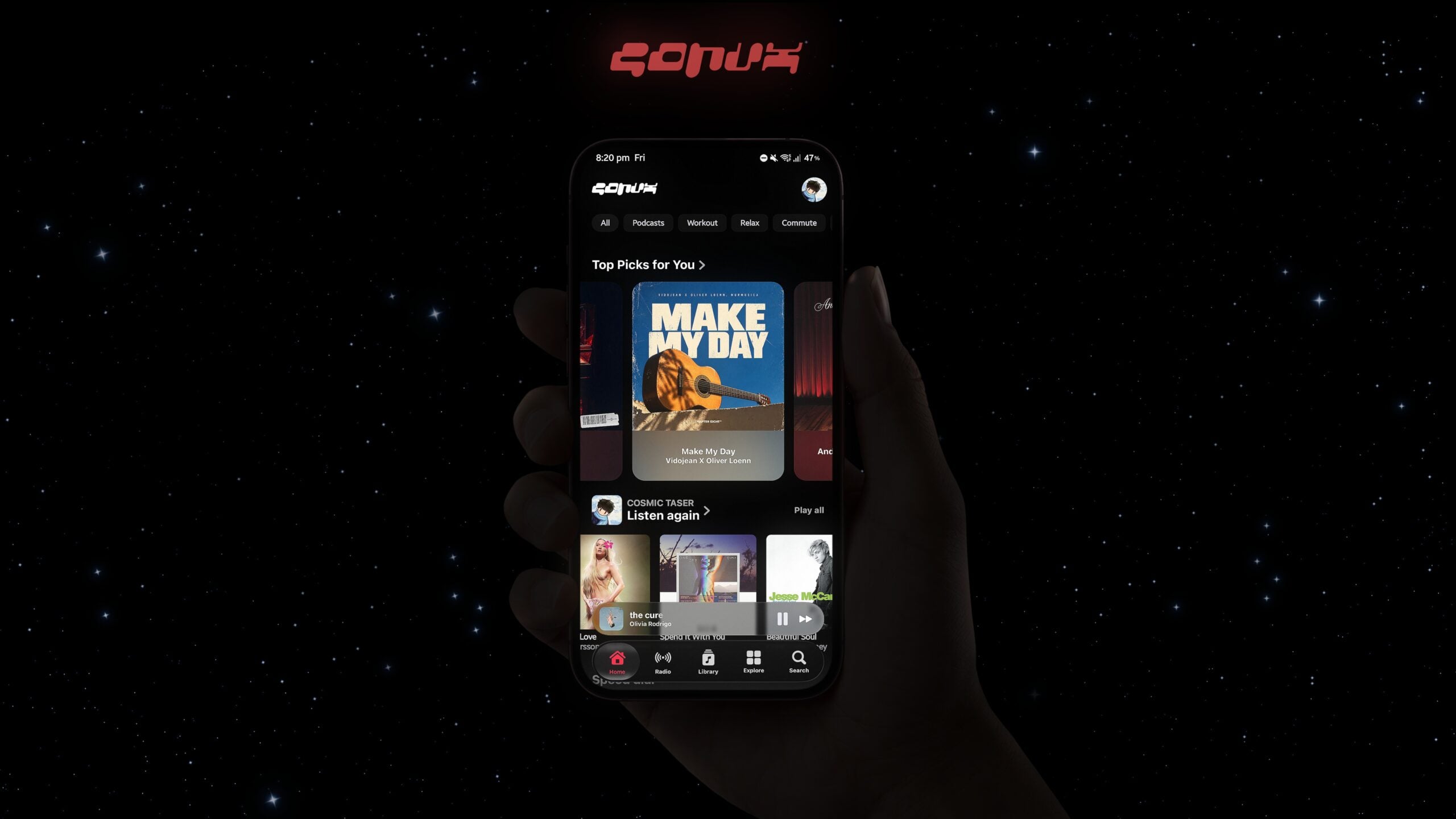
Under the pretty surface, Convx is a complete music player. You can browse and stream music, save songs for offline listening, build queues and playlists, set a sleep timer, change playback speed, and tweak the sound to your taste with an equalizer. What makes it stand out among the heavy hitters is its DJ-style playback. You also get automix, crossfade, and smooth transitions between one song and the next. Lyrics are synced word by word and come from several providers, plus it gets animated artwork.
Convx can play local files and even songs stored on a home server or NAS through SMB and WebDAV. You can choose the option to import your Spotify playlists, show what you’re playing on Discord, scrobble to Last.fm, recognize songs playing around you, and use Listen Together to sync playback with friends.
Spotube is the veteran here, with over 46,000 stars on GitHub, and it works differently from the rest. Instead of being locked to one service like Spotify or YouTube, it runs on plugins. You choose your own music sources, metadata, and playlists through plugins made by the community, or if you’re good with it, you can write one yourself.
The biggest advantage is that it works everywhere. Spotube runs natively on Android, Windows, macOS, and Linux. This means you can use the same app on your phone and your laptop. It’s small, fast, and light on data. You can import and sync playlists from popular music services or manage them locally. It gives time-synced lyrics from public lyric databases no matter which source you use. Offline downloads are supported, with proper metadata and ID.
Privacy is one of the biggest highlights of Spotube. It collects no telemetry and no user data. Installing it is also easy, because you can download it through winget, Scoop, Chocolatey, Homebrew, Flatpak, and F-Droid.
SimpMusic is that one app that does everything. It’s a free YouTube Music client for Android and desktop that borrows many of Spotify’s best ideas. You can play music from YouTube Music or regular YouTube without ads, and it gets you background playback. You can browse the home feed, charts, podcasts and moods, search everything on YouTube, cache songs for offline playback and use Android Auto.
SimpMusic Wrapped gives you a year-in-music recap just like Spotify’s. Then there is monthly recap playlists and listening charts that stay on your device. There are three Now Playing styles, including one that looks like Apple Music, and the lyrics are synced in 12 languages. You can even share lyrics as an image.
You can switch to 1080p video with subtitles, skip sponsor segments with SponsorBlock, see dislike counts with Return YouTube Dislike, and use a 10-band equalizer with AutoEq headphone profiles.
If you care most about sound quality, I would suggest LastWave. If you want something simple, pick Musify. If design matters to you, try Convx. If you want plugins and an app that runs on every device you own, choose Spotube. If you want the most features in one place, install SimpMusic. The best part is that all five are free and can be installed side by side, so you can try a few and keep your favorite. You will get access to unlimited songs from the best sources in good quality. Let us know which one you chose, and comment below if you have a different app that you use for listening to music.