


The topic Claude Code’s agent teams are impressive, but beginners should start smaller is drawing steady attention: readers, analysts, and industry watchers are all tracking how the story may unfold in the days ahead.
This is taking place in a fast-moving context — product cycles, platform shifts, and competitive moves can reshape the outlook quickly, so the details below are worth a careful read.
What follows is a clear walkthrough of the main facts and angles you need to make sense of the news.
Claude Code agent teams can finish complex tasks faster, but there’s not ideal for every project. Beginners may do better to start smaller.
If you’ve read anyone discussing what they’ve built with Claude Code, you may have seen mention of using agent teams. If you’re new to Claude Code, you might want to jump straight in and assign a team of agents to your task, but in many cases, this is far from the right choice. As a beginner, it’s more important to get to grips with the basics of Claude Code before you start trying to use a team of agents.
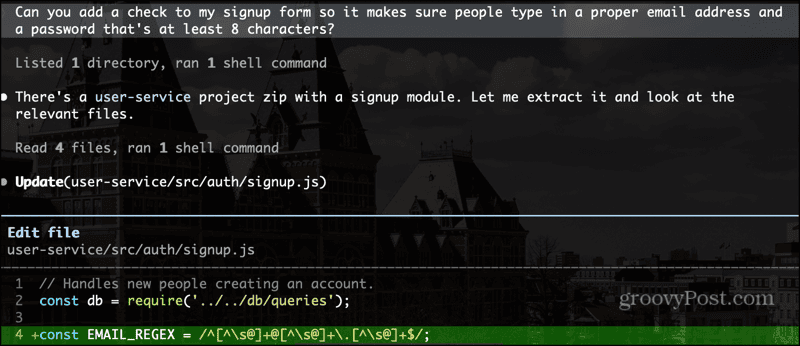
When you’re working on a project in Claude Code, there are usually a lot of steps. You need to write the code, design tests, draft documentation, and more.
You can work through the process in a linear fashion, using Claude Code to perform each task in order. At the end of the process, everything will have been completed, but it may take a lot of time, since Claude Code can’t start the second task until it’s finished the first.
It’s effectively like assigning all the tasks to a single junior developer, who has to work through the assignments one at a time. If you had a team of junior developers, you could assign each of them a different task, and they could work through their tasks at the same time, meaning that the project would reach completion much faster.
This is exactly what Claude Code’s agent teams are. Instead of Claude Code working through each phase of the project from start to finish, the tasks can be delegated to different agents, with a main agent coordinating everything. It can significantly reduce the time it takes to complete a project.
Using Claude Code’s agent teams sounds like a no-brainer. Why use one agent to work on a task when you can use an entire team? The problem is that using a team of agents isn’t always the best option.
First, every extra agent comes with a cost. Each agent consumes additional tokens, and whether you’re on a limited subscription plan for Claude or you’re paying for usage, a team of agents can burn through tokens far faster than a single instance of Claude Code working on its own.
In addition, multiple agents will generate more output, which means far more questions to answer, code to review, and problems to fix. If the task isn’t divided cleanly, some agents may also inadvertently duplicate work or make conflicting changes.
You may find that running five agents doesn’t get the task done five times faster, because it’s still necessary to coordinate and verify the results. If your agent team burns through your available usage, you may be unable to carry on until your limit resets.
Another issue for beginners is that while using a team of agents may feel like the most efficient way to complete your project, it’s not always the case in practice. Agent teams work best when the work can genuinely be split into smaller independent pieces.
for example, if you need to audit different parts of a large codebase, assigning different parts to different agents is a sensible idea. If you need to write tests and update documentation, two individual agents may achieve your goal faster than one. If there are multiple serious bugs in your code, assigning an agent to investigate each issue can make sense.
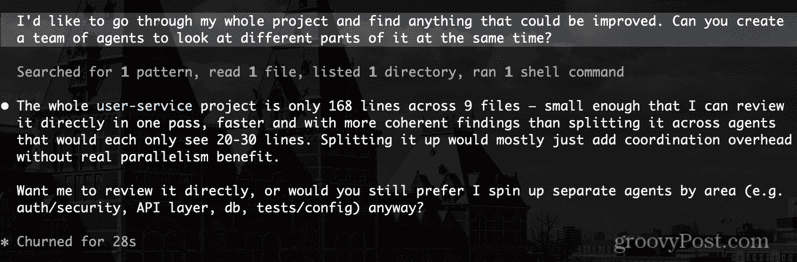
The reality is that for many beginners, these aren’t situations that you’ll be facing. You might need to fix a single bug or add one additional feature. You might need to ask questions about some existing code or refactor a single file. None of these things benefit from using multiple agents; you won’t necessarily complete them any quicker, and you’re likely to use more tokens in the process.
As a beginner, your first instinct shouldn’t be to assign a team of agents to whatever task you want to achieve. You should only use the feature when it will genuinely be of benefit.
The biggest question then becomes how to know when using an agent team would be beneficial and when it wouldn’t. The best way to know this is to learn how to work effectively with a single agent first. Once you know how to use a single agent effectively, you’ll begin to see where a team of agents can be genuinely beneficial.
Start off by seeing what Claude Code can do for you without a team of agents. Learn how to break large tasks down into more manageable steps, and how to write clear prompts with enough context that Claude Code will achieve what you want the first time around. Learning how to review every change rather than just blindly accepting what Claude Code suggests is also very useful. If you’re not sure what a change means, you can ask Claude Code to explain why it wants to perform a change, and why it chose that particular solution.
It also helps to learn how to use Git so that you can safely undo mistakes. This becomes even more important when you have multiple agents working on the same code, with each agent having the potential to introduce mistakes that can then quickly multiply.
Perhaps the most useful skill to learn is how to iterate with Claude Code. It’s highly unlikely that you’ll end up with exactly what you want on the first try, and even if you do, you may think of another feature you want to add or remove. Adjusting each result to make improvements is far easier to learn with a single agent than it is with five different agents all working on different things. Once you’ve learned these skills, they will be invaluable when you start using agent teams.
When you learn about a powerful tool such as the agent teams in Claude Code, it can be tempting to want to start using it straight away. You really only benefit when the tasks can be genuinely separated and delegated, and for most beginner projects, using agents will be overkill. They’re always there when you’re ready to start using them.
Your email address will not be published. Required fields are marked *
Save my name and email and send me emails as new comments are made to this post.