
The topic The Best MagSafe Wallets for Your Everyday Carry (2026) is drawing steady attention: readers, analysts, and industry watchers are all tracking how the story may unfold in the days ahead.
This is taking place in a fast-moving context — product cycles, platform shifts, and competitive moves can reshape the outlook quickly, so the details below are worth a careful read.
What follows is a clear walkthrough of the main facts and angles you need to make sense of the news.
The best MagSafe wallets are compact, slim, and svelte, and they attach securely to your iPhone (or MagSafe-compatible case). They are handy if you only want to carry a few cards, like your work badge or train fare. MagSafe wallets are also great for anyone who wants to travel light and forgo a traditional wallet entirely. We’ve tested dozens, and our favorites are below.
Read our MagSafe guides for more useful accessory recommendations, including the Best MagSafe Accessories, Best MagSafe Power Banks, Best MagSafe Wireless Chargers, and Best MagSafe Grips.
Updated November 2026: I’ve added new wallets to our honorable mentions section and removed discontinued products. I’ve also checked for accuracy throughout.
MagSafe is Apple’s magnetic technologies built into the iPhone 12, iPhone 13, iPhone 14, iPhone 15, iPhone 16 (excluding the iPhone 16e), iPhone 17, iPhone 18 Pro, and iPhone Duo. It features a hidden ring of magnets on the back of the phone and was developed to create a faster, more precise wireless charging system. Those magnets also connect to accessories such as external batteries, car mounts, and wallets.
If you use a case on your iPhone, make sure it’s also MagSafe (the case will have a ring of magnets inside). This will ensure a proper connection with MagSafe accessories. If you use a non-MagSafe case, the connection will be very weak, and MagSafe products may just slide off your iPhone. We have lots of case recommendations in our guides:
When buying a wallet, make sure it supports MagSafe or Qi2 connections. The product description should indicate this prominently. Qi2 is the wireless charging standard, and all MagSafe iPhones support Qi2. Android phones now also support Qi2, and some have magnets inside, like the Google Pixel 10 and Pixel 11 series (Google calls it Pixelsnap).
MagSafe wallets use the same ring of magnets that lets them snap directly onto the back of the iPhone or a MagSafe- or supported Qi2 case. This gives the wallet a strong and secure hold on your device. The wallets we’ve included in this guide all have the MagSafe seal of approval.
Apple first introduced MagSafe for its iPhones in 2020. The following models support the technologies:
To use a MagSafe wallet with an Android phone (or the iPhone 16e), you’ll need to use a MagSafe case. Several case manufacturers have started adding a ring of magnets to Android phone cases to bring the same magnetic experience native to iPhones.
No, MagSafe will not demagnetize your credit cards. Credit cards have magnetic stripe encoding strong enough to resist demagnetization, and the MagSafe wallets in this guide include a built-in shield designed to keep your cards safe. However, you may run into issues with hotel key cards and some gift cards. Keep those away as a precaution.
I use a MagSafe wallet every day as my primary wallet. I check that it snaps firmly onto the iPhone or MagSafe case—and that it doesn’t slide off when I take my phone out of my pocket, bag, or jacket. I also make sure cards fit well in the sleeve and don’t fall out. I only recommend wallets that feel durable, are easy to use, and can hold the standard amount of cards (at least two to three). I occasionally call on my fellow WIRED reviewers for long-term testing or to check out new models.
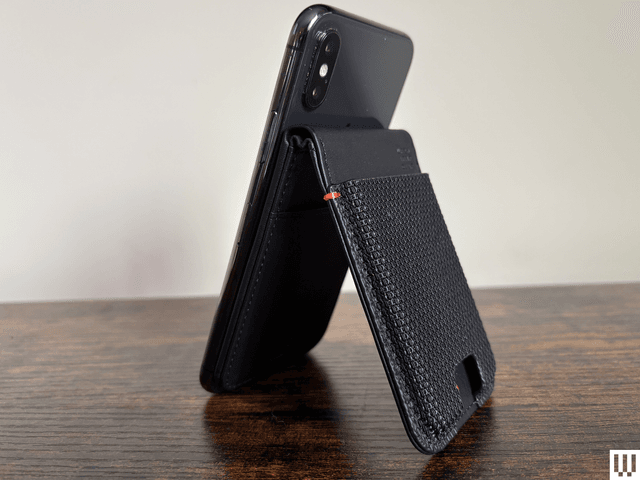
UAG’s Metropolis MagSafe wallet is on the spendier side, but you won’t be replacing it in a year or two. It is lightweight yet robust with Kevlar construction. There’s a large slot on the back that can hold up to three cards, and you can unfold the wallet and store an additional three (or cash) inside. It also pulls double duty as a stand if you need to prop up your phone, and you can orient your phone in landscape or portrait mode. —Molly Higgins
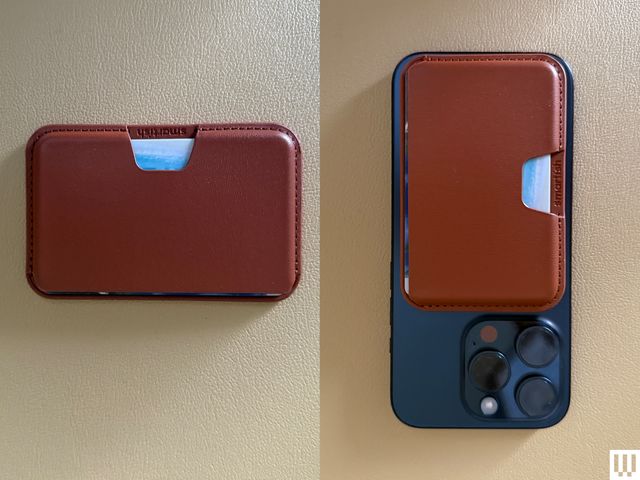
Smartish’s MagSafe wallet makes me wish all wallets had a slot on the side to push out the cards. I never had to take it off my phone to access cards. Just give the spacious side opening a little push with your thumb, and the cards slide out. My cards remained secure, and I never had an issue with them falling out. It’s made of vegan leather, and Smartish offers a few fun designs. —Brenda Stolyar
This luxe, super-thin leather MagSafe wallet from Nomad has Apple’s Find My feature built in, so you can easily locate it in the Find My app if it’s misplaced. That does mean you need to charge the wallet, but don’t worry, there’s no proprietary cable here. Instead, the wallet can be wirelessly charged on any MagSafe or Qi2 charger; once it’s fully charged, the battery lasts for five months. Easy peasy.
It’s made from vegetable-tanned Horween leather with a polycarbonate frame, and it can hold up to four cards. (A less expensive version that uses Nomad’s Camino leather is also available.) It looks classy, and it’s great for anyone with a tendency to lose things. —Molly Higgins
Note that Nomad also sells a dedicated tracker card, which can add Find My to any wallet but will take up valuable space in a MagSafe version.
I love this wallet from Moft, which is compatible with Apple Find My, so you always know where it is. It’s relatively standard-looking, but it has a built-in tripod, which came in handy numerous times when I wanted to film a quick outfit check or take a group photo. It raises your phone camera to 8 inches high, and the wallet is very sturdy, so you can dial in the right angle. It works in landscape or portrait orientation. With space for two cards, it isn’t the roomiest but is rich in features. —Louryn Strampe
You can always rely on Casetify for unique designs. Its Snappy MagSafe wallet is available in various styles and colors. It’s slim, durable, and sleek—the illustrations haven’t faded after months of use. It’s made from vegan leather (aka plastic), but Casetify uses BioVeg, derived from recycled polyester and vegetable oil from non-food and GMO-free corn crops.
It can hold up to three cards, and there’s a built-in shield that protects them from magnetic damage. My only gripe is that it can be a little difficult to pull the cards out when the wallet is attached to your phone or case. I typically have to detach it and use the opening from the back to slide out the cards. —Brenda Stolyar
Ridge’s metal MagSafe wallet feels solid and high-quality. A few of us tested it, and it reliably held our setups, including one tester’s daily carry of eight cards plus a thicker tracking card. The magnets could be stronger, but Ridge does sell a strengthening tray that might be useful if you’re concerned.
This wallet can be a little weird to use at first, but you build up muscle memory quickly. There’s a finger slot for pushing cards out, and you slide them back in on the opposite side. Ridge also includes a Torx screwdriver and extra screws, which are useful for switching out the plates, adding or subtracting room for cards, or adding on accessories like the brand’s wallet chain or cash strap. —Louryn Strampe
Most MagSafe wallets are designed to hold just a few cards, but I love the Moft Snap Field because it can hold so much more. You get plenty of storage space for cards—technically up to eight cards, though more reasonably seven—alongside a dedicated slot for an extra SIM card and a SIM card ejector.
That extra room already puts the Snap Field a step ahead of most other MagSafe wallets, but you can also store just about anything you want inside. It uses a folding design held together by magnets, so you can quickly throw in cash, coins, or paper cards. Regardless of what you store inside, you can easily get to your cards with a pull tab. And, if all of that wasn’t enough, the backing that attaches to your phone can pop out and function as a kickstand. —Jacob Roach
ESR’s MagSafe wallet isn’t bulky, but it also isn’t so thin that it feels insubstantial. It doubles as a kickstand and sticks to my phone reliably. There’s space for five cards—three in the external pockets, plus another two on the inside. I really like the clear window that keeps my ID separate and handy to flash when I get carded. This wallet is simple, but that’s the beauty of it, and it’s affordable to boot. If you want something basic, it’s a good option to consider. Just keep in mind that the included RFID-blocking card probably isn’t necessary. —Louryn Strampe
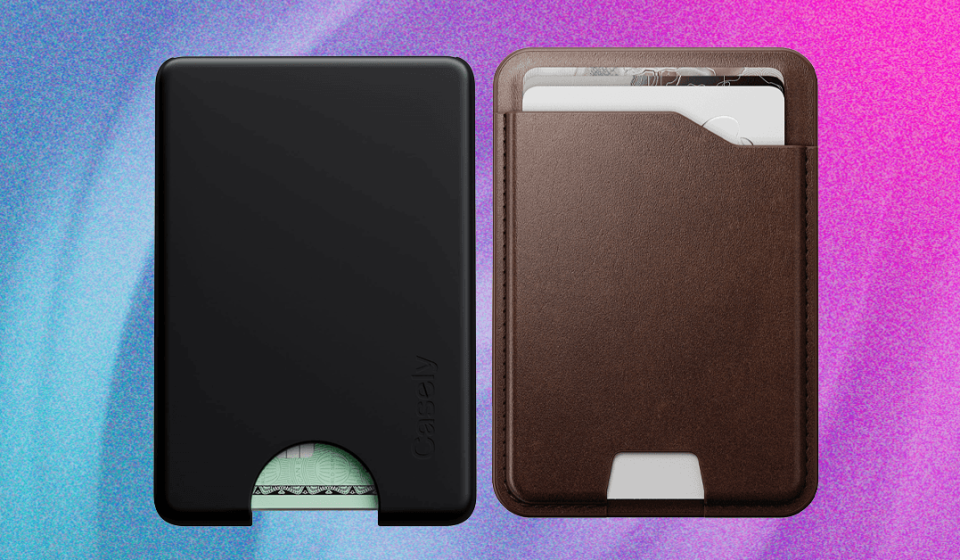
Casely’s wallet is made of hard silicone, so it’s slightly heavier and thicker than the other ones I’ve tested. It feels similar to having a MagSafe battery pack on the back. I don’t mind the extra weight and thickness because it makes it easier to grip my phone case. There’s a dedicated slot at the bottom that makes sliding cards out a breeze. Just know that if you pair it with the complementary Casely case, the whole thing is bulky. But darn if it doesn’t look cute. —Brenda Stolyar
I’m obsessed with PopSockets grips—I have one on my phone and one on my Kindle. If you’re also a fan and don’t want to get rid of the accessory with a MagSafe wallet, well, you don’t have to. The Popwallet+ is both a PopSockets grip and a wallet. It fits up to three cards (or more, depending on the thickness), and the cloth opening at the bottom makes it easy to push out the cards. The grip works the same way a standard one does, with the ability to expand and collapse. You can swap out the tops if you ever get bored with the design. —Brenda Stolyar
Supcase’s MagFlip wallet and stand is extremely sturdy, and feels unbreakable. It’s constructed almost entirely out of metal, fitted with huge magnets that never let go and thick hinges around the body. You can store up to five cards in the wallet itself, and there’s an RFID-blocking card that sits at the end, though this kind of protection is largely unnecessary.
It doubles as a two-height stand as well. You can kick the wallet back and prop your phone up, but if you rotate the wallet around, you can position your phone even higher with a kickstand that keeps everything stable. Even with the rugged, almost militarized construction, SupCase still offers a handful of attractive colors, including one that combines a faux leather exterior with regal gold accents. —Jacob Roach
A lot of MagSafe wallets just feel like a pocket on the back of your phone. This one from ESR feels like an actual wallet. It comes in a variety of stylish options with a slick metal-tipped clasp and detailed construction. There’s a clear window for your ID, a roomy card pocket, and a compartment that can hold two bills. The card compartment can technically hold up to four cards, but I prefer two or three for easier access. If you want space for cash as well as the other essentials, or you want a leather-type wallet that has more design choices than some competitors, I recommend this one. —Louryn Strampe
Looks like you need some MagSafe for your MagSafe. Look no further than the Valentinus wallet from Spigen. It’s constructed out of polyurethane leather and can technically hold three cards (I’m able to easily fit four). It comes with a handy card cutout at the bottom so you can quickly thumb through them. The real draw is an extra MagSafe ring built into the back of the wallet.
Stack a MagSafe grip on the back, mount your phone to a MagSafe car stand, or attach whatever other MagSafe accessory you want; you don’t need to take off your wallet first. You can’t charge your phone through it, but the convenience of using other accessories while keeping your wallet attached is worth the price of admission. —Jacob Roach
Moft’s Snap-on Phone Stand and Wallet is another good kickstand wallet option. You can set it up at three angles: one for scrolling through your phone, one for streaming media, and one for video conferencing. It feels sturdy, and the case isn’t bulky. I wouldn’t put more than two cards in this one, though. I usually use it to carry my license and debit card, while the rest are in my Apple Wallet. —Brenda Stolyar
Alternatively, Moft sells a trackable version with Apple Find My capabilities. It even comes in versions that can match your iPhone. It isn’t super roomy, but I still like it.
ESR Geo Wallet Stand for $47: Apple’s Find My app lets you track your devices if they’re lost, and ESR’s Geo wallet has it built right into the wallet itself. This is the wallet I’ve been using for the past few weeks, and outside of its Find My capabilities, I love that it strikes a great balance between size and usability. ESR says it can hold up to three cards, but I’ve been using mine with four—three cards plus my ID—and I can get them all out easily. Although having a wallet with magnetic charging pins is weird—the Find My feature requires a battery that lasts three months—you can turn it off if you don’t care for it (but then, maybe just buy a different wallet). It does kind of suck that you need a proprietary charger to recharge your wallet, though. The magnets adhere well to the back of the phone, and you can pop open the wallet and use it as a kickstand. ESR even includes a strap on the back that works as a phone grip.
OtterBox Symmetry Series Cactus Leather MagSafe Wallet for $45: This wallet is nice and simple, thin, lightweight, has a strong hold on my phone case, and offers a dedicated fabric-covered slot at the bottom to push the cards out (I was able to fit three without much trouble). This OtterBox wallet is made from cactus-based leather, which feels nearly as luxurious as real leather. Just know that cactus leather isn’t as eco-friendly as it’s made out to be—these cases are still infused with layers of plastic.
Spigen MagSafe Classic LS Wallet for $40: This cool-looking wallet incorporates design inspiration from the classic Macintosh computers. The gray might seem a little bit drab, but any Apple enthusiast will likely enjoy the nod to the computers of yesteryear. It’s otherwise pretty standard fare, with space for up to three cards. I like the thumb notch, which makes it easy to slide your cards out.
Pelican Protector MagSafe Wallet: This MagSafe wallet is simply too bulky. It’s difficult to slip into a pocket, and we don’t think the protective hardshell is worth the trade-off since it can only hold two or three cards.
Kate Spade New York Morgan MagSafe Wallet: This wallet looks nice, but the finish starts to degrade with regular use. It also opened on its own once or twice, which left me worried about a card slipping out.
Ohsnap! Snap Grip Wallet: I had high hopes for this one, mainly because of its build quality. The wallet is aluminum, can hold up to eight cards (depending on whether they have raised lettering or not), has MagSafe support, and comes with a grip that doubles as a kickstand. Unfortunately, the grip is made of plastic, and it broke after a short time (it won’t fold properly back into place). The magnetic hold isn’t as strong as other MagSafe wallets, even with a MagSafe-approved case on my phone. None of that is great, especially at this high price.
Apple FineWoven MagSafe Case: Any time this wallet is separated from your iPhone, you’ll get an alert and can track it in Apple’s Find My app. It has a single slot that fits up to three cards, but to remove them, you have to take it off your iPhone and push the cards up through the slot on the back. Unfortunately, Apple’s MagSafe wallets use only the company’s proprietary FineWoven material (made from recycled materials). It’s a commendable effort to reduce reliance on leather production, but several WIRED reviewers have said the material doesn’t hold up well over time.
Journey Loc8 Universal MagSafe Slim Wallet: My cards would slip out of this wallet if I didn’t have it stuffed full, which makes it an obvious “Do Not Recommend” choice when so many other comparable wallets don’t have this problem.