

Skip to content
-
Subscribe to our newsletter & never miss our best posts. Subscribe Now!
  • https://www.facebook.com/
  • https://twitter.com/
  • https://t.me/
  • https://www.instagram.com/
  • https://youtube.com/
LearningHub LearningHub
  • Home
  • Privacy Policy
  • Home
  • Privacy Policy
Subscribe
Close

Search

Uncategorized

Got an iPhone Duo? These 9 settings make it easier to use

By
November 15, 2026 2 Min Read
0

The topic Got an iPhone Duo? These 9 settings make it easier to use is drawing steady attention: readers, analysts, and industry watchers are all tracking how the story may unfold in the days ahead.

This is taking place in a fast-moving context — product cycles, platform shifts, and competitive moves can reshape the outlook quickly, so the details below are worth a careful read.
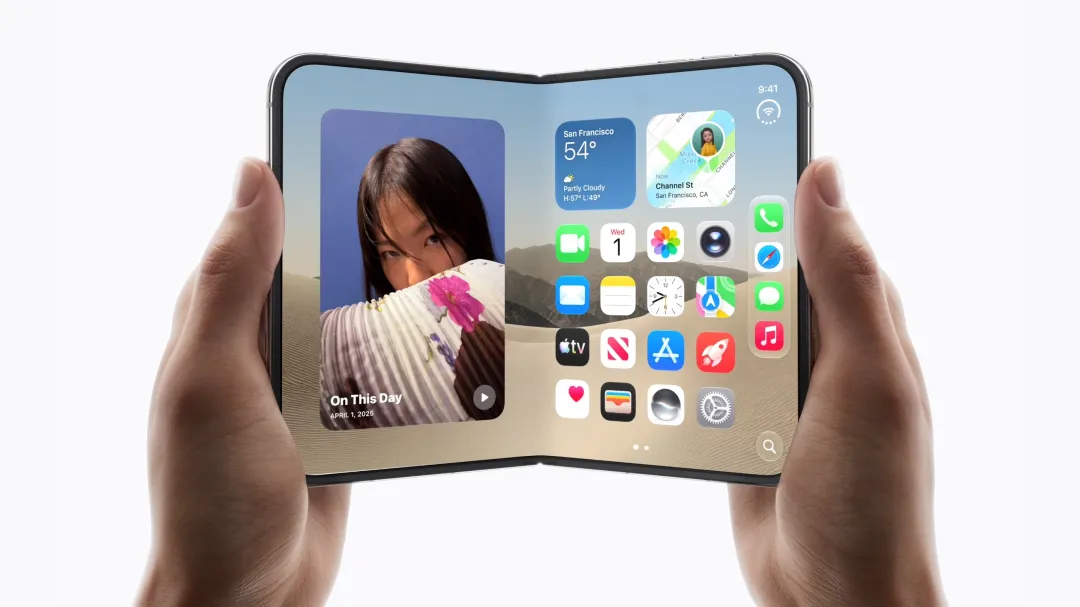
What follows is a clear walkthrough of the main facts and angles you need to make sense of the news.

Apple’s new foldable, the iPhone Duo, has proven popular enough that the company can’t keep the device in stock. While the Duo introduces a new way to use an iPhone, getting the most out of this initial version may require adjusting a few settings to make it work better when it comes to everyday tasks, like unlocking the device with Touch ID, navigating the interface, and taking photos.

After spending some time with the Duo, we’d recommend making the following adjustments to make the new iPhone a bit easier to use, most notably when it comes to the use of Touch ID.

Unlike modern iPhones, the Duo doesn’t support Face ID. That means you have to adjust to pressing a finger on the side of the device once again to authenticate with apps, unlock the device, and use Apple Pay. But there are a few things you can do to make the switch back to the older technologies a bit less painful.

There are a few settings that could also improve your experience with the iPhone Duo, as they may make it easier to perform certain everyday tasks, like taking screenshots or reaching different parts of the screen, among other things.

The camera tricks are a little more niche, but some Duo owners have found the following to be helpful.


Why it matters

Stories like this often nudge public expectations, shape how rivals respond, and can move sentiment faster than a single data point would suggest.

When a major player makes a call, the rest of the field tends to answer — that is why the wider context here still matters, even as details continue to update.

What to look out for next

The next chapters will come from follow-up reports, product changes, and how users and partners react in public channels.

If you are following this space, it is worth checking back: clearer numbers, policy moves, and competitive reactions often arrive in waves rather than in one headline.

Tags:

DeviceEasierIphoneSettingsTaking
Author

Follow Me
Other Articles
Previous

I Put the Best Digital Notebooks to the Test. Here Are My Favorites (2026)

Next

South Korea's top scorer in tax accountancy exam admits cheating

No Comment! Be the first one.

Leave a Reply Cancel reply

Your email address will not be published. Required fields are marked *

Recent Posts

  • A month with the iPhone Duo has changed how I use my phone
  • The Best MagSafe Wallets for Your Everyday Carry (2026)
  • 1Password says it was hacked but users' vaults are safe
  • The Witcher 3's new patch adds 40 cross-platform mods, fixes plenty of…
  • Your mothership is a giant pinball machine and your ball is its defence system in…

Recent Comments

No comments to show.

Archives

  • November 2026
  • October 2026

Categories

  • Uncategorized
Copyright 2026 — LearningHub. All rights reserved. Blogsy WordPress Theme
We use cookies to ensure that we give you the best experience on our website. If you continue to use this site we will assume that you are happy with it.