

The topic Gemini’s New AI Agent Is Surprisingly Useful (If You Use Google for Everything) is drawing steady attention: readers, analysts, and industry watchers are all tracking how the story may unfold in the days ahead.
This is taking place in a fast-moving context — product cycles, platform shifts, and competitive moves can reshape the outlook quickly, so the details below are worth a careful read.
What follows is a clear walkthrough of the main facts and angles you need to make sense of the news.

Google loves a rebrand. What started off as “Spark” is now “Task” in Gemini—not to be confused with Google Tasks, the to-do app. Google took its Spark AI agent, which used to live in a separate tab, and integrated it into the Gemini interface. Gemini Task is available globally, and it’s completely free to use for some. That said, some features are limited to the U.S. and, of course, subject to some pretty strict usage limits. While not exactly a replacement for ChatGPT Dots or Meta Muse, you can think of Gemini Task as a controlled version of an AI agent that can do quite a lot in the background.
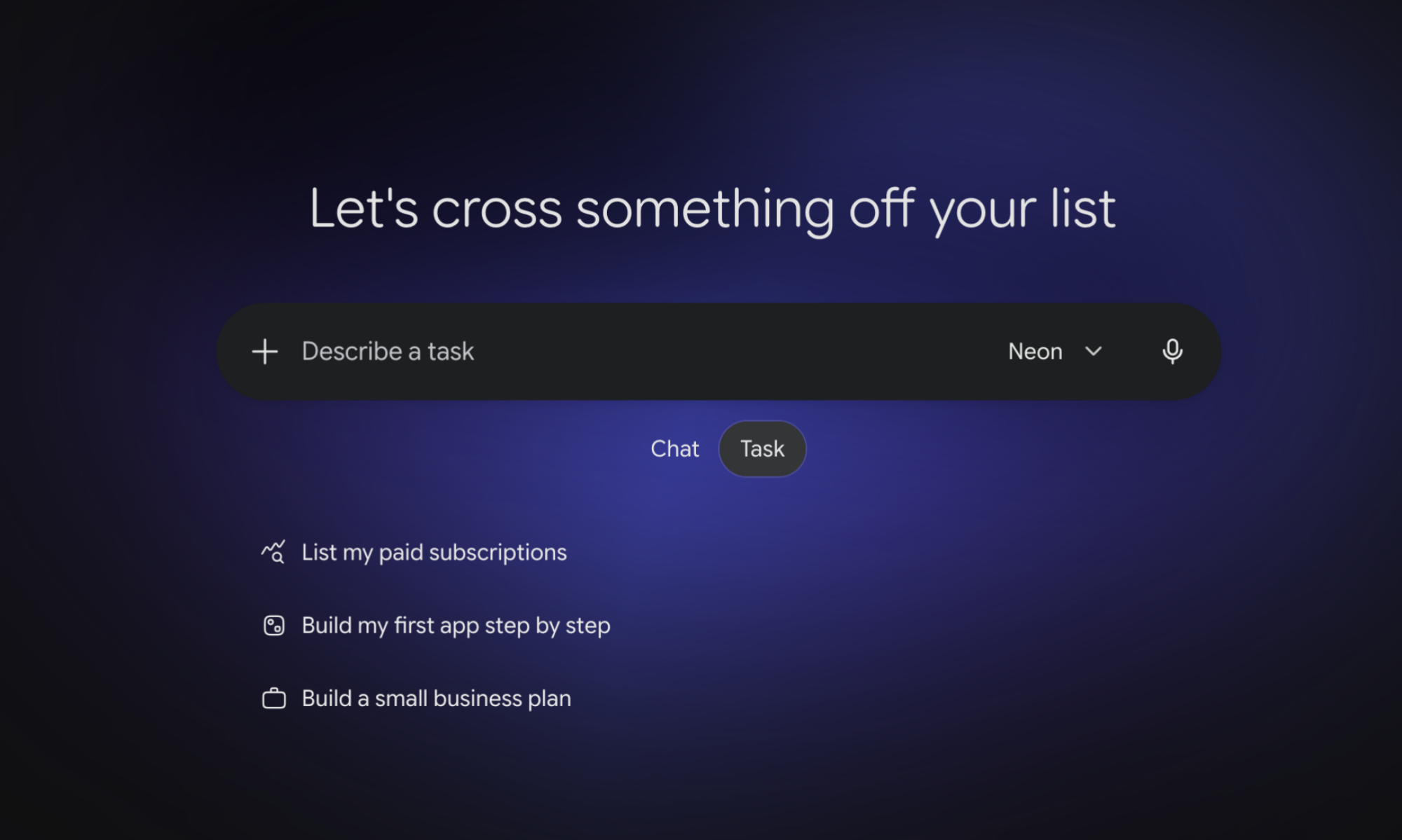
To use Task, open Gemini and create a new chat. You’ll see a Task tab next to Chat. Switch to it, and start writing your prompt. (You’ll also see some suggested options here.) Type your task or action and press “Send.” The feature works best if you’ve already enabled Personal Intelligence on your Google account, and have connected services like Gmail, Google Drive, and Photos as well. You can then tag “@Gmail” to use your Gmail account, or even a third-party connector. Task natively supports automation, so you can say something like, “run this task once every day,” and the AI will add it to your Scheduled Tasks section.
Of course, I did the thing that every AI demo wants you to do: I asked Gemini to create a daily morning briefing for me, highlighting all important emails, calendar appointments, and tasks. And, in my experience, it works really well. It reminded me of this article’s due date, that I have a couple of pitches in my inbox to review, that a credit card bill is due soon, and that there are some holidays around the corner.
Gemini is very good at retrieving information from emails and taking action. for example, I created an automation that collects all my coffee orders for the month and presents the data in Google Sheets. I then asked Task to create a subscription manager for me. Instead of paying for a third-party app, it took a few minutes to collate the services I pay for into one list. It even accounted for the currency differences (some subscriptions are in USD, some in INR) and gave me a tally in INR, along with things like average monthly cost, and more.
While Gemini can connect to the open web, it’s quite a hostile place right now for an AI bot. Websites are blocking agents from accessing their pages, which hinders their effectiveness. I asked Gemini to create a task that monitors the price of the Sony WH-1000XM5 headphones daily. For this, it asked my permission to spin up a remote browser, and loaded up Amazon, only to be blocked instantly. It did succeed in opening Croma though (a national retailer in India), but it took almost a minute for it to figure out that the price had not dropped below what I asked for. Would it be quicker and less resource-intensive if I did this myself? Yes, but the fact that Gemini can do this every evening like clockwork is the real advantage—as long as the websites comply, that is.
If you’re going to try Task in Gemini for free, there are some limitations you should know about. The free plan only lets you run tasks once per day, and you can’t be granular about the exact timing. (Paid Gemini plans have no such restrictions.) You can only run 10 tasks at the same time, while the limit is 50 tasks for AI Pro users. Compute-based usage limits will also apply, based on your plan. The free access is currently live in India, the U.S., Canada, Australia, Japan, and South Korea.
Some features, though, are only for U.S. users. Gemini’s feature that lets you call businesses on your behalf is restricted to the States, as is the ability to forward emails to [email protected] to automatically turn the contents of the email into a task (like adding a college schedule to your calendar). U.S. users can also connect their Google Wallet account to set up payments at supported stores.
Gemini Task is not a proactive agent, nor is it trying to be. You still have to check the work. You have to approve any important steps, and if a website blocks AI models, there’s not a lot Gemini can do about it. For someone like me, who’s all-in on the Google ecosystem, I do see value in Gemini Task. The deep and robust Gmail integration is worth it alone. If you’re on the free plan, set up a couple of background tasks related to Gmail, Google Drive, or background research that run every morning, and call it a day. And if you’re paying for AI Pro, you can get a lot more done.